
Invoice Additional Charges lets you control how non-inventory charges on electronic invoices are handled in RFMS E-Commerce. For each charge type (such as shipping, delivery, fuel, pallet, tax, or special finish), you can either group it with the freight charge or post it separately by assigning the appropriate General Ledger account code.
This gives you consistent posting for common invoice add-ons without forcing every invoice to include every charge type, and the settings default to grouping charges with freight.
In RFMS go to E-Commerce > Utilities > Setup > Invoice Additional Charges
Steps to Add Additional Charges
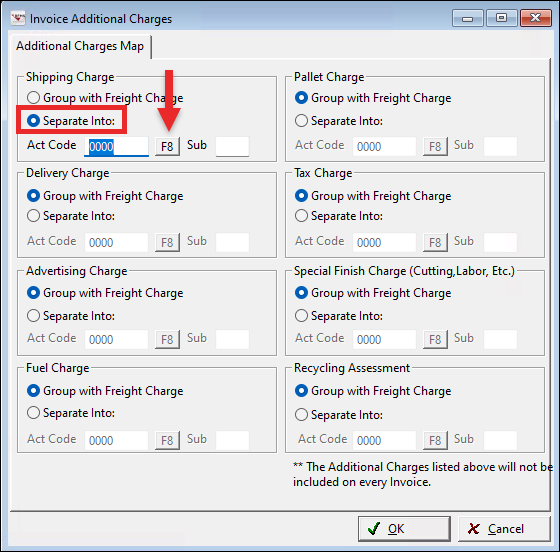
- Open the Invoice Additional Charges dialog.
- Locate the section for the charge you want to configure (for example, Shipping Charge or Fuel Charge).
- Select the radio button for Separate Into.
- In the Act Code field, press F8 to open the Chart of Accounts.
- Select the appropriate General Ledger account code (and subaccount, if applicable).
- Click OK to save your changes.
Comments
Please sign in to leave a comment.